Need Help with my D-Mod


Well, this is my first post/topic, but to the point.
I have been trying to make a D-Mod for quite some time, but keep running into some annoying reocurring errors.
Note: I have read through tut1.txt, look over some of the dink scripts, praticed scripting, and downloaded and read through The Rudiments Of Scripting (forget who made it, sorry).
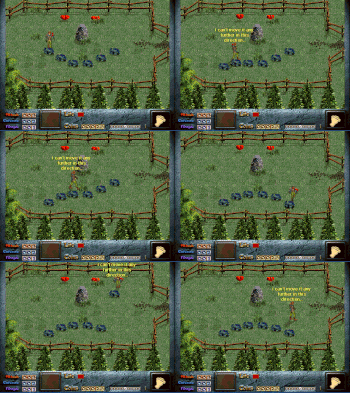
First of, i can't change the starting map, it always starts on the first square i edit, which is anoying if i want to change it, same problem with where the player starts on the map. Also the map screens won't connect, i can't get the player to walk to the edge of the screen, then move to the next screen. I though it made it work atomatically, but I can't get the player to move from screen to screen (they are right beside eachother). I turned screenmatch and put an object down, so that it mathced to the next screen, but the player still can't walk to it. This is really anoying because i have allot of stuff layed out, and nothing can be gotten to by the player. I would appreciate some help, and thanks to whoever decides to give me a hand.
Also: What command can be used to make an object invisible.
PS: My idea for my D-Mod is rather neat, or so I think...
I have been trying to make a D-Mod for quite some time, but keep running into some annoying reocurring errors.
Note: I have read through tut1.txt, look over some of the dink scripts, praticed scripting, and downloaded and read through The Rudiments Of Scripting (forget who made it, sorry).
First of, i can't change the starting map, it always starts on the first square i edit, which is anoying if i want to change it, same problem with where the player starts on the map. Also the map screens won't connect, i can't get the player to walk to the edge of the screen, then move to the next screen. I though it made it work atomatically, but I can't get the player to move from screen to screen (they are right beside eachother). I turned screenmatch and put an object down, so that it mathced to the next screen, but the player still can't walk to it. This is really anoying because i have allot of stuff layed out, and nothing can be gotten to by the player. I would appreciate some help, and thanks to whoever decides to give me a hand.
Also: What command can be used to make an object invisible.
PS: My idea for my D-Mod is rather neat, or so I think...


To change the starting map, you could edit start-1.c and add the following:
&player_map = ...;
where ... is the map square, of course. This script is the script that's attached to the Start button so you should add that line in the procedure it runs when the user clicks the button, I think it's click but I can't verify that right now. You can also set the x and y-coordinates where Dink should start by using sp_x() and sp_y():
sp_x(1, ...);
sp_y(1, ...);
The problems with walking to adjoining screens should be solved when you've specified the map square correctly because once the game knows that Dink's on a certain screen, it knows where the player can walk to.
To make an object invisible, you can use:
sp_visible(&crap, 0);
if I remember correctly - &crap is the variable that refers to the sprite that should become invisible (so use 1 for Dink or use int &crap = sp(12); to make that sprite invisible).
&player_map = ...;
where ... is the map square, of course. This script is the script that's attached to the Start button so you should add that line in the procedure it runs when the user clicks the button, I think it's click but I can't verify that right now. You can also set the x and y-coordinates where Dink should start by using sp_x() and sp_y():
sp_x(1, ...);
sp_y(1, ...);
The problems with walking to adjoining screens should be solved when you've specified the map square correctly because once the game knows that Dink's on a certain screen, it knows where the player can walk to.
To make an object invisible, you can use:
sp_visible(&crap, 0);
if I remember correctly - &crap is the variable that refers to the sprite that should become invisible (so use 1 for Dink or use int &crap = sp(12); to make that sprite invisible).
I know about the start-1.c
But I was putting sp_map(#, #);, like said in tut1.txt
So I should hcange it to &player_map = #; and all of my problems should go away?
Does it need to be in a specific spot in start-1.c
Also, how can you make sprites go back to thier default hardboxes and depth dots, accidenlty eddited a few. How would you make the D-Mod play different midi files (not main games midi files).
One-thousand thanks!!
Echo
But I was putting sp_map(#, #);, like said in tut1.txt
So I should hcange it to &player_map = #; and all of my problems should go away?
Does it need to be in a specific spot in start-1.c
Also, how can you make sprites go back to thier default hardboxes and depth dots, accidenlty eddited a few. How would you make the D-Mod play different midi files (not main games midi files).
One-thousand thanks!!
Echo
November 7th 2006, 10:47 AM

rabidwolf9


The tutorial was wrong. You should use &player_map = x; in place of your sp_map(x,x); or you could change the value of &player_map in main.c I think.


Gah, dumb password box  Any changes you make concerning the hardboxes and depth dots are changed in dink.ini. The last ones modified are the ones on the bottom, so just delete those last lines.
Any changes you make concerning the hardboxes and depth dots are changed in dink.ini. The last ones modified are the ones on the bottom, so just delete those last lines.Like I said, &player_map = ... should be in void click(void) if I recall correctly. Put it somewhere in the beginning and it should work just fine: the game should know the value before the game actually starts.
Also, how can you make sprites go back to thier default hardboxes and depth dots, accidenlty eddited a few
This information is stored in the Dink.ini file.. you can manually edit this file and remove the lines that the game added for you at the bottom of the file (or you can simply remove it and copy the Dink.ini file from the /dink game in case you didn't do any important hardness editting). New midi files can be added by placing these files in the /sound directory of your D-Mod. Then they can be run/used just like the midi files in the original game.
But tut1.txt is a bit basic, you should check some of the Tutorials in the Downloads section; especially the DinkC Reference is handy (it lists and explains all the DinkC commands)
Also, how can you make sprites go back to thier default hardboxes and depth dots, accidenlty eddited a few
This information is stored in the Dink.ini file.. you can manually edit this file and remove the lines that the game added for you at the bottom of the file (or you can simply remove it and copy the Dink.ini file from the /dink game in case you didn't do any important hardness editting). New midi files can be added by placing these files in the /sound directory of your D-Mod. Then they can be run/used just like the midi files in the original game.
But tut1.txt is a bit basic, you should check some of the Tutorials in the Downloads section; especially the DinkC Reference is handy (it lists and explains all the DinkC commands)
I have read through a bit of DinkC.whatever
I also read through The Rudiments of Scripting, which was very helpfull I might add.
Would there be a tutorial somwherethat shows you how to change yor main charaters model (I am confused by the tutorial download section, most don't seem like tutorials, also I have a size limit (amount a floppy disk can hold), due to the fact I have no intenet where I live.
Thanks once again,
Echo
I also read through The Rudiments of Scripting, which was very helpfull I might add.
Would there be a tutorial somwherethat shows you how to change yor main charaters model (I am confused by the tutorial download section, most don't seem like tutorials, also I have a size limit (amount a floppy disk can hold), due to the fact I have no intenet where I live.
Thanks once again,
Echo